SQS: the outbox, at-least-once, and dead letters
Notes from building a small event-ingestion pipeline on SQS, and the handful of patterns that make reliable messaging work.
SQS: the outbox, at-least-once, and dead letters
I come from a .NET / Azure background, so to actually learn AWS SQS I built a small event-ingestion pipeline in Python instead of just reading docs. A handful of patterns stood out. Here they are.
Overview:
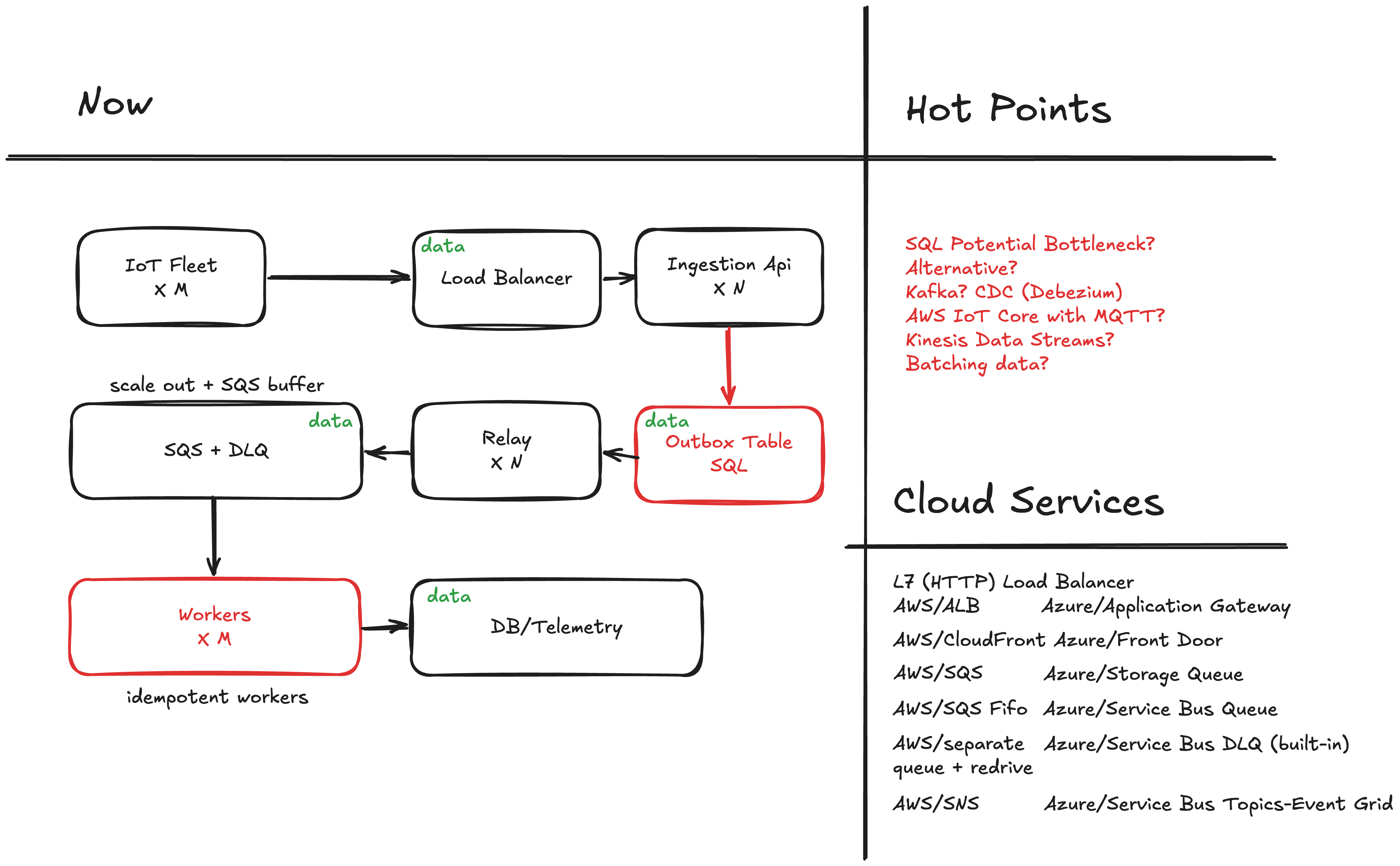
Long story short, text version
IoT Device → HTTP → Application → [outbox table] → relay → SQS → worker → datastore
                                                                 └─→ DLQ (poison messages)
Four tiny processes, one codebase, one queue in the middle.
1. Don't publish to the queue from the request
My first instinct: handle the request, then send_message. But if the DB write commits and the SQS call fails (or vice-versa), you get lost or phantom data. And in a data-driven system that's the worst kind of bug: it fails silently, and every downstream reading, dashboard, and decision quietly inherits the missed data.
The fix is the transactional outbox: the request writes the event into an outbox table in the same DB transaction as its other work. A separate relay polls that table and publishes to SQS. Either the transaction commits (event saved, will be sent) or it doesn't (nothing happened). No partial failures, the messaging version of "don't do two side effects and pray."
2. Pick your poison: duplicates or loss
The relay does two things per row, publish to SQS, then mark the row sent, and can crash between them:
- mark → publish: crash in the gap → row says sent, nothing published → lost forever.
- publish → mark: crash in the gap → row still pending → re-published → duplicate.
You can't have neither. A duplicate is usually recoverable; a loss isn't. So you choose at-least-once: publish first, mark second. The same choice repeats on the consumer — process, then delete. Crash between → redelivered, never lost.
3. …so the consumer must be idempotent
At-least-once only works if "process twice" == "process once." Key your writes on the event's natural identity (upsert / last-write-wins) and duplicates become harmless, the second just overwrites identical data. No idempotency, no at-least-once; they're a pair. It is free with Influx DB as well, we are just overriding a point.
4. Visibility timeout & the receipt handle
receive_message doesn't remove the message it hides it for a visibility timeout (default 30s) and hands you a receipt handle, a one time claim ticket. You work, then delete_message with that handle to ack. Crash or time out before deleting, and it reappears for someone else. That's the at-least-once guarantee baked into the queue. (The receipt handle isn't the message id — it's proof you're the current holder, and it changes every receive. Same instinct as a peek-lock in Azure Service Bus.)
5. Long-poll, don't sleep-loop
My relay sleeps between passes, it polls a DB table. My worker has no sleep at all, because receive_message(WaitTimeSeconds=20) long-polls: it blocks until a message lands or 20s pass. The blocking is the pacing no busy spin, fewer empty calls, lower latency. Set WaitTimeSeconds, delete your sleep.
from django.db import transaction
from django.utils import timezone

from contexts.ingestion.infrastructure.models import OutboxEvent, Status
from contexts.ingestion.infrastructure.sqs_publisher import publish


def relay_pending(batch_size=10):
    sent_count = 0
    with transaction.atomic():
        batch = (
            OutboxEvent.objects
            .filter(status=Status.PENDING)
            .order_by('created_at')
            .select_for_update(skip_locked=True)
            [:batch_size]
        )
        for event in batch:
            publish(str(event.message_id), event.payload)
            event.status = Status.SENT
            event.sent_at = timezone.now()
            event.save(update_fields=["status", "sent_at"])
            sent_count += 1
    return sent_count
import json
from functools import lru_cache
import boto3
from django.conf import settings
@lru_cache
def _client():
return boto3.client('sqs', endpoint_url=settings.AWS_ENDPOINT_URL)
def publish(message_id, payload):
url = _client().get_queue_url(QueueName=settings.SQS_QUEUE_NAME)['QueueUrl']
body = json.dumps({"message_id": message_id, "payload": payload})
_client().send_message(QueueUrl=url, MessageBody=body)6. Poison messages and the dead-letter queue
A message that always fails would redeliver forever and wedge the consumer. The answer is a dead-letter queue + redrive policy: set maxReceiveCount = 5 on the main queue, pointing at a second queue. After five failed receives, SQS moves the message to the DLQ, zero code. So i found very handy DLQ coming free with SQS.
The catch: the consumer must survive the bad message for this to fire. Wrap each message in try/except, log it, and don't delete it let it redeliver and age into the DLQ. Then a small reaper drains the DLQ (log, alert, archive). Resist blindly deleting dead messages; that throws away the evidence of why they failed.
The lesson: it's mostly config
Two things surprised me. One image, many entry points web, relay, worker and reaper are the same codebase started with different commands; the logic lives in plain functions, each process a thin loop around one. And LocalStack → real AWS was a one-line change: I developed against LocalStack with endpoint_url=http://localhost:4566, and switching to real SQS just meant removing that env var so boto3 resolves the real endpoint. Wire that seam from day one.
None of this is SQS specific; it's how reliable messaging works anywhere. But building it end to end, crashing it on purpose, and watching a message ride to the DLQ made it stick in a way no diagram ever did.
What's next?
I'm really happy with this core scaffolding, but it raises my next question: how scalable is this system? I imagine it fed by hundreds of thousands of IoT devices, so let's investigate that next. I already have another Django application that mimics many different IoT devices generating data, and every reading needs to be delivered efficiently, without loss, and accurately.
Todo:
- Scalability
- Testing
- Docker/K8
- Frontend
Comments